
Home
Solutions
Oil & Gas IndustryPersonal Care & Fine Chemicals IndustryIntelligent Equipment
Contact Us
News
About Us
Tiếng Việt

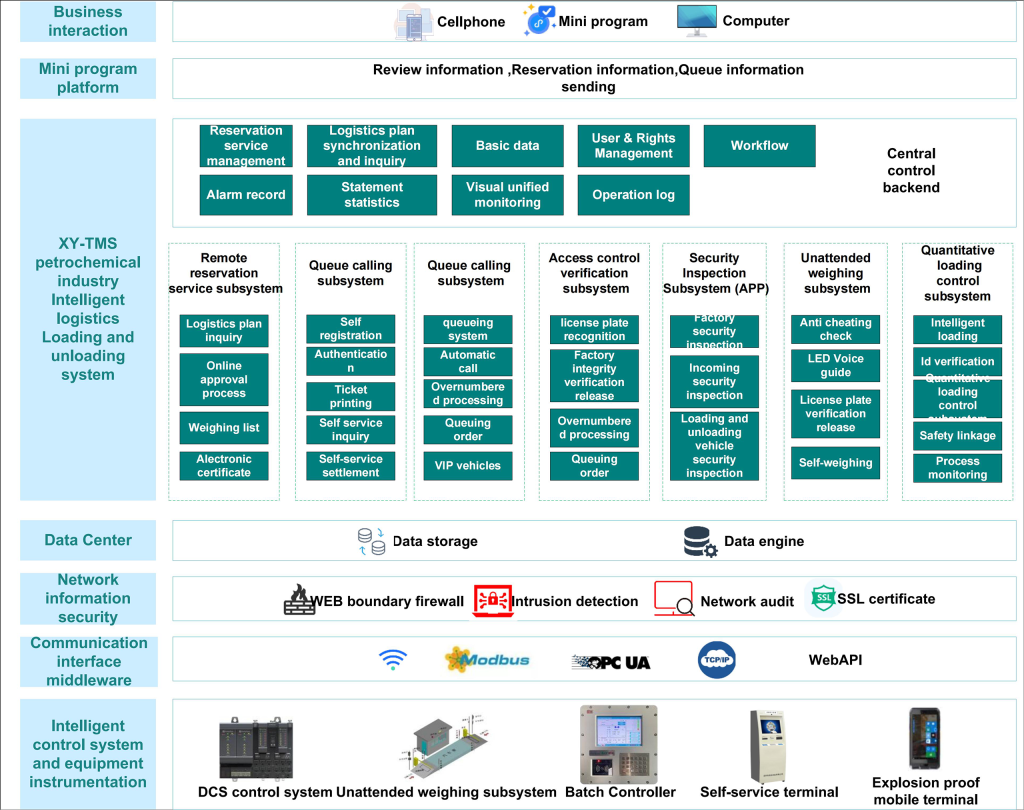
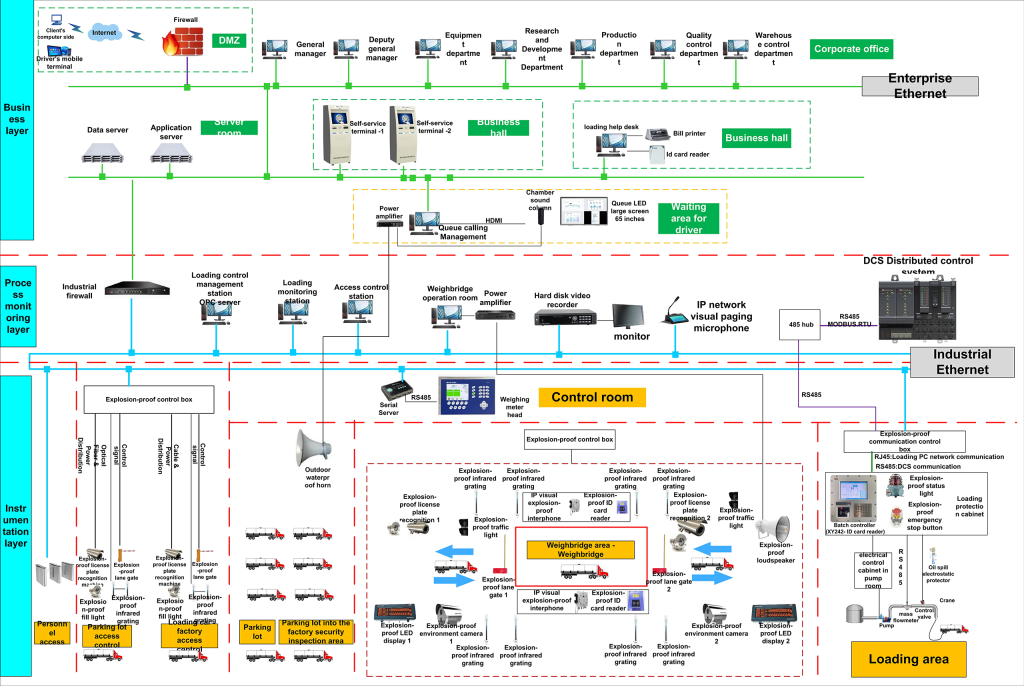
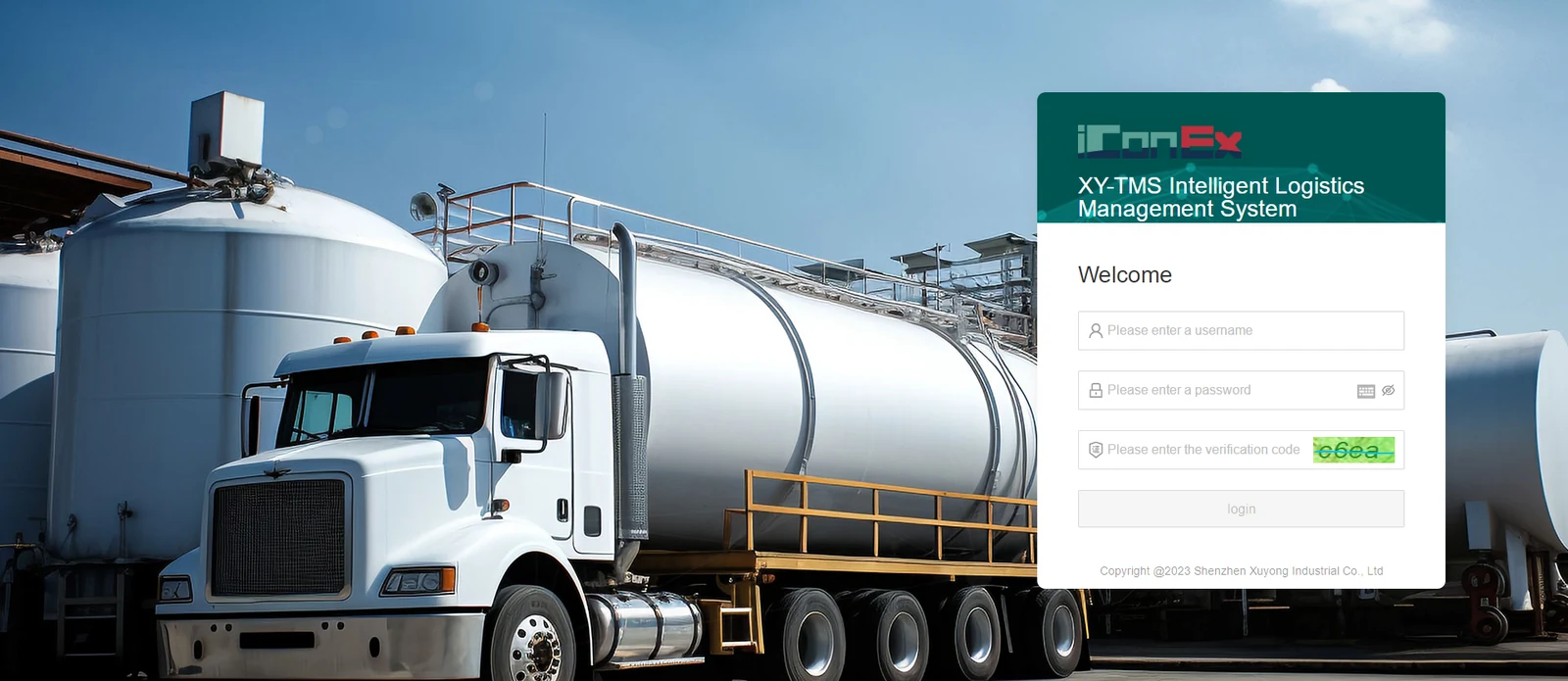
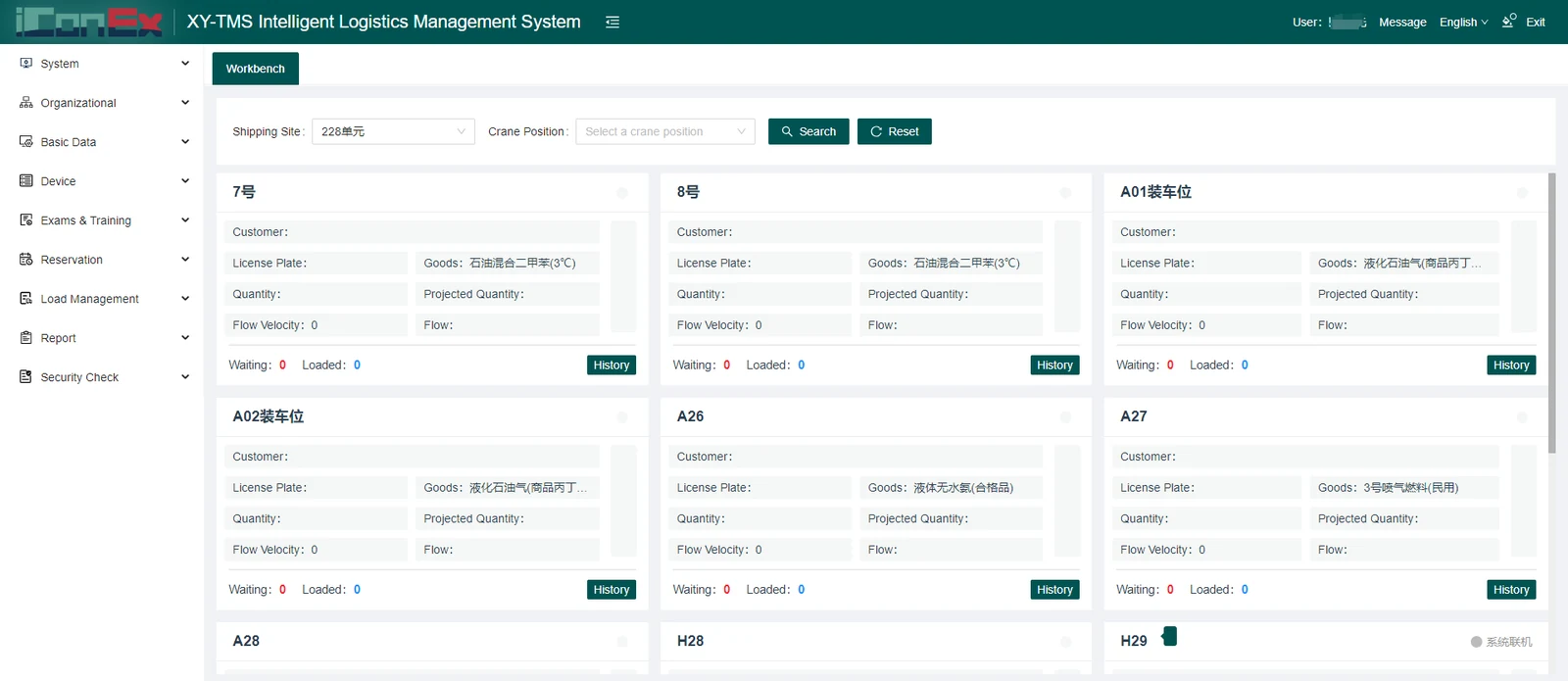
| Number | Module | Features | Functional Description |
|---|---|---|---|
| 1 | System Administration | Role Management | System user maintenance and permission allocation |
| System Settings | Define system parameters including code, name, value, remarks, company name, company address, account number, contact, contact number, decimal place Settings. | ||
| System Menu | Add system menu includes menu coding, menu name, operation type, superior menu, status type, operation type (web menu, app menu) authorization identifier, menu icon, menu path, sort | ||
| Login Log | Record user login information, including account, login time, and IP address. | ||
| Operation Log | Record the operation records of each user,Including account, document type, operation content, operation type, operation time; | ||
| 2 | Organizational Structure | Employee Data | Define system employee information: employee code, name, gender, education background, major, date of birth, address, email address, mobile phone number, entry date, contract expiration date, age, department; |
| Division Management | Define system department information, including department code, department name, superior department, person in charge, and person in charge telephone number; | ||
| 3 | Basic Data | Material Management | Define oil basic information includes material code, material name, material group, material category, material specification, unit of measure, enabled or not, density,settlement method,the settlement method supports flow meters and weighbridges; |
| Customer Management | Customer basic information includes: code, name, transaction currency, address, company phone, fax, contact, email, company website, reconciliation requirement, Invoicing Instructions, payment notice, payment method, settlement method, agent, region, customer type, remarks, tax rate, bank, account number, tax number, business scope | ||
| Supplier Management | Defining supplier basic information includes code, name, transaction currency, address, company telephone, fax, contact person, email, company website、Reconciliation requirement, invoicing Instructions, payment notice, payment method, settlement method, agent, region, customer type, remarks, tax rate, bank, account number, tax number, business scope; | ||
| Registration of Vehicles | Defining vehicle information includes main license plate number, hanging license plate number, road transport certificate number, vehicle dangerous transport certificate number, pressure vessel license number(tank)、approved load for road transport(ton), maximum loading capacity (at atmospheric or pressure), pressure vessel (tank) inspection validity period, technical grade of vehicle, licence number, retirement life, date of initial issue, the date of this pass issue, vehicle registration date, annual audit registration date, expiration date, next annual audit date, operation status, inspection and treatment status, transport unit, road transport business license number, vehicle categories include VIP vehicle, blacklist vehicle, normal vehicle; vehicle types include van, tanker, trailer; | ||
| Escort Management | Description: Escort personnel information includes name, gender, date of birth, age, ID number, mobile phone number, road dangerous goods transport operation certificate number, validity period, and status. The status includes normal and blacklist. Function: View, add, modify, delete, submit for review, review, import, and export. |
||
| Driver Management | Description: Define driver information including name, gender, date of birth, age, ID number, mobile phone number, road dangerous goods transport operation certificate number, validity period, and status. The status includes normal and blacklist. Function: View, add, modify, delete, submit for review, review, import, and export. |
||
| Crane Position Management | Description: Define loading/unloading position information including crane position number, loading/unloading location, oil product code, oil product name, and status (normal or out of service). Function: View, add, modify, and delete. |
||
| Weighbridge Management | Description: Define weighbridge information for weighing the gross and tare weight of vehicles, including weighbridge name, loading position (unloading position), serial port number, baud rate, data bit, check bit, stop bit, single/double direction setting, status (normal, disabled), and working mode (one-way: single entry and single exit; two-way: double entry and double exit). Function: View, add, modify, and delete. |
||
| 4 | Equipment Management | Equipment Data | Description:Define equipment information including loading location (unloading location), equipment code, equipment name, equipment type, supplier, manufacturer, purchase date, storage location, characteristics, specifications, accessories, equipment status, etc. Function: View, add, modify, and delete. |
| Equipment Maintenance Plan | Description:Define equipment maintenance plans including loading position (unloading position), equipment code, equipment name, plan name, maintenance cycle, planned start time, maintenance content, etc. Function: View, add, modify, and delete. |
||
| Equipment Maintenance Register | Description:Define equipment maintenance records including equipment maintenance plan, equipment code, equipment name, maintenance content, maintenance person, maintenance date, description of replacement/repair parts, etc. Function: View, add, modify, and delete. |
||
| 5 | Examination and Training | Question Bank Management | Description:Set up the test question library, including question number, question name, question type, single-choice and multiple-choice questions, A/B/C/D options, correct answer, and status (available or disabled). Function: View, add, modify, and delete. |
| Examination Management | Description:Test papers are used for driver’s booking tests. When the driver makes an appointment, the system randomly assigns a video or document and generates the corresponding test paper for the test, including test code, test paper name, effective date, expiration time, test duration, number of questions, score per question, question type, learning video, cover image, etc. Function: View, add, modify, delete, and status. |
||
| Examination Record | Review the records of each test, including driver’s name, ID number, mobile phone number, test date, test paper number, score, and test record. | ||
| 6 | Booking Management | Reservation List | Query driver appointment information including bill of lading number, scheduled delivery time, loading location (unloading location), planned delivery date, vehicle information, escort information, oil product, and delivery quantity. |
| Bill of Lading | Query driver pickup information including appointment status, loading location (unloading location), bill of lading number, item number, item name, driver’s name, ticket number, etc. | ||
| 7 | Loading and Unloading Management | Booking Period | Define the number of vehicles that can be reserved for a product within a certain period. A period can also be set to allow reservations only for VIP vehicles. For each loading point, the booking period of the loading position (unloading position) needs to be configured, including time period, products, number of vehicles available for reservation, loading position (unloading position), etc. |
| Loading Position (Unloading Position) Management | Define loading position (unloading position) information, including loading position (unloading position) code, loading position (unloading position) name, organization, and status. | ||
| Alarm Record | Record abnormal conditions during loading and unloading, including bill of lading number, license plate number, pre-loading quantity, flow rate, actual loading quantity, and alarm information. | ||
| 8 | Report Center | Reservation Sheet Report | Collect reservation information, including loading location (unloading location), appointment time, driver information, vehicle information, etc. |
| Bill of Lading Report | Generate statistics of bill of lading information, including bill of lading number, loading position (unloading position), loading arm position number, delivery quantity, actual loading quantity, loading date, driver information, vehicle information, etc. | ||
| Crane Alarm Records | Record statistical information of crane location alarms, including crane location number, loading position (unloading position), alarm time, alarm reason, etc. | ||
| Current Vehicle Status of The Plant Area | Statistics on the loading status of all vehicles in the factory for the current day. | ||
| Daily Undelivered Records | Daily statistics of drivers who have made appointments but have not arrived at the factory for loading, including bill of lading number, loading position (unloading position), booking number, booking period, driver information, loading date, escort information, etc. | ||
| Electronic Weighing Manifest | Query and export bill of lading information, including bill of lading number, loading position (unloading position) code, product, driver information, and other information. | ||
| 9 | Security Management | Security Configuration | Configure security inspection settings, including security inspection categories, security inspection item names, loading/unloading location codes, and loading/unloading location names. |
| Security Check Record | Driver security inspection records include inspection type, inspection items, inspection results, order ID, etc. | ||
| 10 | Reminder Management | Driver’s License Validity Reminder | Driver’s license expiration reminder. |
| Driver’s Information Modify Reminder | When a driver modifies personal information, the system reminds administrators to review and verify the changes. | ||
| Driver Qualification Certificate | Driver qualification certificate expiration reminder. | ||
| Escort Qualification Certificate | Escort qualification certificate expiration reminder. | ||
| Vehicle Annual Review Date Reminder | Vehicle annual inspection reminder. | ||
| The Reservation Information Reminder | Reminder for completion of driver’s electronic waybill and escort information. | ||
| Bill of Lading Planned Quantity and Overload Reminder | When synchronizing the bill of lading, if the planned quantity is greater than the vehicle’s rated load capacity, the system reminds the sales staff on the PC terminal, and the sales staff are required to modify the planned quantity. |
| Number | Modules | Features | Function Description |
|---|---|---|---|
| 1 | Driver Reservation | Appointment Booking Query | Query appointment information by entering the corresponding license plate number, or search through historical records. |
| Safety Inspection | After watching the training materials (videos/documents), the driver takes the exam. If the exam is passed, the driver will be redirected to the appointment interface. If the exam fails, the driver needs to retake it until passing. If the exam is not completed within the specified time, it must also be restarted. | ||
| Reservation Form | Users can select and reserve an available time slot. After successful reservation, the available quota for that time slot will decrease. If the vehicle misses the scheduled appointment three times and the reservation is not canceled, the vehicle will automatically be added to the system blacklist. | ||
| 2 | Appointment Record | Bill of Lading Inquiry | Query bill of lading information by entering the bill number or product name, or search through historical records. |
| View Status | View the current real-time status of the bill of lading, including entering the parking lot, acceptance, receipt printing, calling, entry, first weighing, pre-loading security inspection, loading security inspection, post-loading security inspection, second weighing, and bill of lading printing. | ||
| Appointment Rescheduling | Modify the bill of lading appointment within the current available time range. Registered bill of lading information cannot be changed. After successful modification, a WeChat service notification will be sent to remind the user that the appointment time slot has been released. Each bill of lading can only be modified once. | ||
| Additional Information | Complete additional information for the escort and electronic waybill. Search for escorts, select one escort, and upload the escort’s photo. | ||
| Cancel an Appointment | Cancel the bill of lading appointment within the available time range (registered bills of lading cannot be canceled). After successful cancellation, a WeChat service notification will be sent with an appointment release reminder. | ||
| 3 | Setup and View | Authorization Settings | Authorize appointment release notifications, photo/video access, and mobile phone number access. |
| Modify Account Information | Description:Modify account information.Function: ID card verification, image upload, illegal image detection, and certificate expiration reminder. |
| Serial Number | Modules | Features | Function Description |
|---|---|---|---|
| 1 | Driver Reservation | Appointment Booking Query | Query appointment information by entering the corresponding license plate number, or search through historical records. |
| Safety Inspection | After watching the training materials (videos/documents), the driver takes the exam. If the driver passes the exam, they will be redirected to the appointment interface. If the driver fails the exam, they need to retake it until passing. If the exam is not completed within the specified time, it must also be restarted. | ||
| Reservation Form Reservation | Select and reserve an available time slot. After successful reservation, the available quota for the selected time slot will decrease. If the vehicle misses the scheduled appointment three times and the reservation is not canceled, the vehicle will automatically be added to the system blacklist. | ||
| 2 | Appointment Record | Bill of Lading Inquiry | Query bill of lading information by entering the bill number or product name, or search through historical records. |
| View Status | View the current real-time status of the bill of lading, including entering the parking lot, acceptance, receipt printing, calling, entry, first weighing, pre-loading security inspection, loading security inspection, post-loading security inspection, second weighing, and bill of lading printing. | ||
| Appointment Rescheduling | Modify the bill of lading appointment within the current available time range (registered bills of lading cannot be modified). After successful modification, a WeChat service notification will be sent with an appointment release reminder. Each bill of lading can only be modified once. | ||
| Additional Information | Complete additional information for the escort and electronic waybill. Search for escorts, select one escort, and upload the escort’s photo. | ||
| Cancel an Appointment | Cancel the bill of lading appointment within the current available time range (registered bills of lading cannot be canceled). After successful cancellation, a WeChat service notification will be sent with an appointment release reminder. | ||
| 3 | Setup and View | Modify Account Information | Modify account information.Function: ID card verification, image upload, illegal image detection, and certificate expiration reminder. |
| 4 | User Login | Login | User enters a username and password to log in to the system. |
| 5 | User Registration | Registration | Register a system account. |
| Serial Number | Modules | Features | Function Description |
|---|---|---|---|
| 1 | Self-service Ticket Verification | Authentication | The driver scans an ID card, IC card, or QR code at a self-service terminal, and facial recognition is used to verify the driver’s identity for self-registration. |
| Self-service Registration | Scan an ID card, IC card, or QR code to display loading business document details, support self-service ticket selection and processing, and complete self-service registration. | ||
| Self-service Settlement | Print self-service settlement documents for loading operations by scanning the ID card, IC card, or QR code, and send electronic settlement documents to the driver’s mobile phone after settlement is completed. | ||
| 2 | Self-service Call & Queue | Self-service Queuing | Automatically allocate the loading position according to the bill of lading sequence, loading position status, and number of vehicles waiting for loading. |
| Queuing Information Release | Display queue information on large LCD or LED screens to provide intuitive guidance and information prompts. | ||
| Intelligent Queue Calling | Intelligent voice queuing system that reminds drivers to enter the yard for loading. | ||
| 3 | Security Check management(APP) | Safety Inspection | Used for vehicle safety inspection, including entry inspection, pre-loading inspection, in-process loading inspection, post-loading inspection, and exit inspection. |
| 4 | Vehicle Access Control | Car License Plate Recognition Verification | Based on the vehicle license plate recognition all-in-one device, the system automatically matches the vehicle inspection status and loading document information, and realizes driver and vehicle authorization verification and entry/exit release. |
| Blacklist Management | Vehicles on the blacklist are not allowed to be released. Vehicles that do not queue or receive a calling number are also not allowed to enter. | ||
| Inquiry of Entry and Exit Records | Query historical vehicle entry and exit records based on conditions such as time period, vehicle license plate number, and loading document number. | ||
| Import and Export Video Surveillance | Display real-time images and videos from license plate recognition devices and monitor the entry and exit environment. | ||
| 5 | Unattended Weighing | Weighing Vehicle License Plate Recognition | Before the vehicle enters the weighbridge, the license plate is recognized or the ID card is scanned to automatically match and verify the business documents. If verification is successful, the gate barrier will automatically open to allow the vehicle to pass. |
| Infrared Anti-cheating | If abnormal weighing conditions occur, such as incomplete vehicle positioning or wheels crossing both sides of the weighbridge, the system provides voice reminders to the driver and automatically detects overweight/oversized vehicles. | ||
| Weighing Photograph | When weighing the gross weight or tare weight of the vehicle, the system captures three real-time images of the front, rear, and cargo area of the vehicle and archives them for easy inquiry. | ||
| Tare Abnormal Alarm | When an empty vehicle is weighed, the system software automatically compares the current tare weight with the historical tare weight in real time. If the deviation exceeds the preset positive or negative value, an alarm is generated. | ||
| Signal Control | Control the vehicle weighing sequence through traffic light signals. | ||
| Intelligent Reminder | Whenever weight information is collected, the system automatically provides voice and LED display reminders of the current vehicle weight, as well as guidance for entering and leaving the weighbridge. | ||
| Intelligent Weighing | After the vehicle stops steadily on the weighbridge, the system automatically collects weight data and completes weighing when the data becomes stable. | ||
| Automatic Release At Weighing Completion | After the vehicle completes weighing, the barrier gate automatically opens to allow the vehicle to pass. | ||
| 6 | Manual Console | Monitoring The Loading Process | The loading bay integrates signals such as electrostatic grounding, oil spill protection, flow rate, temperature, pressure, and velocity. These signals are displayed on the loading bay monitoring screen, allowing management personnel and operators to remotely monitor the loading status of all bays in real time. This enables timely monitoring of the status of each loading bay at the loading station, including bay number, customer name, oil product name, vehicle license plate number, expected quantity, actual quantity, instantaneous quantity, cumulative quantity, bay status, and loading progress bar. |
| Manual Billing | Manually register by ID card and create loading documents. | ||
| Monitoring of Crane Position Details | Monitor crane position details, including crane position number, order number, preset quantity, loaded quantity, accumulated quantity, accumulated volume, accumulated mass, crane position status, flow rate, flow velocity, loading progress, density, electrostatic alarm, emergency stop alarm, oil spill alarm, key alarm, loading arm return alarm, human electrostatic alarm, flammable gas alarm, and valve switch status. | ||
| Alarm Information | Query historical alarm information during the loading process, including crane position number, alarm type, and alarm time. | ||
| Loading History | Management personnel and operators can query historical loading data and export Excel files based on fields such as customer, crane position, and vehicle license plate number. | ||
| Historical Curve | Query historical curves of various loading data (such as flow rate, density, temperature, and other parameters) during the actual loading process to analyze whether any abnormalities occurred during loading. | ||
| Business Operation | Cancel loading order, withdraw order, perform emergency unloading, disable loading bay, enable loading bay, connect equipment, disconnect equipment, and reset machine. | ||
| 7 | self-help Car Loading | Identity Authentication | Swipe an ID card, IC card, or scan a QR code to verify identity and automatically match and download loading business documents. |
| Safety Chain | Real-time detection of safety interlock controllers and alarm signals (emergency stop, no flow rate, human electrostatic protection, key management, vehicle electrostatic grounding, vehicle liquid level, gate device interlock, flammable gas interlock, vehicle blocking interlock, loading arm connection interlock, loading arm return, electrostatic spill plug/static grounding clamp return interlock) to ensure safe loading and unloading operations. | ||
| Loading Control | Control the on-site valves and pumps to minimize equipment shock and vibration. The control process includes slow start, constant flow maintenance, full-speed opening, and slow closing to avoid electrostatic hazards caused by oil injection, as well as overshoot and water hammer during valve and pump closing. The system also provides automatic correction of advance valve closing quantity, ensuring a smooth and stable loading process. |
| Serial Number | Modules | Features | Function Description |
|---|---|---|---|
| 1 | Third Party Interface | LIMS System | Unloading supports sending inspection information to the LIMS system; loading supports printing certificates of conformity from the LIMS system. |
| DCS System | Loading and unloading bay data (order number, preset quantity, loaded quantity, cumulative quantity, flow rate, flow, valve status, alarm status, temperature, density, etc.) are transmitted to the DCS system to enable configuration and monitoring of the loading process. | ||
| Measurement System | Synchronize the download of electronic documents for loading and unloading logistics plans, and upload loading and unloading document data (loaded quantity, gross weight, net weight, tare weight, actual loading quantity from the mass flow meter, etc.) to the measurement system after operation completion. | ||
| SRM System | After completion of the unloading operation, upload unloading document data to the SRM system. | ||
| ERP System | Synchronize the download of electronic documents for loading and unloading logistics plans, and upload loading and unloading document data (loaded quantity, gross weight, net weight, tare weight, actual loading quantity from the mass flow meter, etc.) to the ERP system after operation completion. | ||
| 2 | System Security | Equal Warranty 2.0 | The system complies with the national Cybersecurity Classified Protection 2.0 requirements. External services are deployed in a DMZ environment. The system provides network security measures including antivirus protection, firewall, log auditing, bastion host, and other security management and protection functions. |
| 3 | System Emergency management | Network Interruption | When loading and unloading stations are disconnected from the central data center network, the system supports offline document entry and offline loading/unloading operations. After the network resumes normal operation, data is automatically synchronized back to the central data center. |
| 4 | Group Oriented System | Group Oriented System | The system supports centralized deployment, enabling efficient resource integration. |
| 5 | Application Software Localization | Application Software Localization | The system supports software localization, independent control, and information security. Through multiple domestic adaptation certifications, it supports domestic operating systems and databases, including Kirin Advanced Server Operating System, Kingbase, and Dameng. |